


Dell Delivers Market s First NVIDIA GB300 NVL72 to CoreWeave
July 8, 2025
The Blueprint for Modern AI Data Centers
July 10, 2025EchoSpoofing is Back—and It’s Even Easier for Attackers to Reach Inboxes

But these 3 mitigation steps will help you stop them cold
- EchoSpoofing, first revealed in 2024, exploited Office 365 mail flows to send spoofed emails that passed SPF and DKIM checks despite being fraudulent.
- Attackers used hybrid connectors and on-premises servers to bypass Microsoft’s authentication measures, delivering spoofed emails via their own tenants.
- A new EchoSpoofing variant has since emerged, leveraging third-party email hygiene providers to increase the authenticity and delivery success of spoofed messages.
- To mitigate risk of successful attacks, you should enforce strict SPF, DKIM and DMARC policies, avoid high-risk Microsoft IP ranges and use advanced data protection rules with your hosted email security service.
For years, most people in the IT industry had confidence in Microsoft’s ability to strictly control mail flow via Office 365 (these days known officially as Microsoft 365). In other words, they were confident Microsoft had made it impossible for one email customer to impersonate another.
A year ago, that changed.
In July of 2024, researchers at Guardio Labs disclosed a new type of Office 365 authentication bypass attack they called “EchoSpoofing.”
The attackers redirected the spoofed emails through a virtual SMTP server, Microsoft Exchange Online server and a trusted third-party SMTP relay service. By mimicking official email relays with authenticated Sender Policy Framework (SPF) and DomainKeys Identified Mail (DKIM) signatures, the spoofed emails passed standard authentication checks.
Fortunately, the Guardio Labs researchers responsibly disclosed the issue to the targeted email security provider, leading to a speedy and effective remedy. But not before some quick-thinking attackers managed to send millions of convincingly spoofed emails that appeared to come from trusted brands like Disney, Coca-Cola and Nike. The fraudulent emails were designed to steal funds and credit card details.
Echoes of a year ago
The name EchoSpoofing comes from the relay service “echoing” back the spoofed emails and sending them on their way as genuine emails. But no matter the technique, the result is this: Malicious Microsoft 365 (Office 365) tenant owners successfully spoofed the identity of other legitimate Microsoft 365 customers.
While the news of 2024 seems firmly in the rearview for many, we recently noticed the story didn’t end there. In analyzing attack chain activity around the world, the Symantec and Carbon Black Threat Hunters picked up on a new EchoSpoofing variant–a pivot that replaces the original SMTP relay service (the one patched a year ago) with an email hygiene provider.
Breaking down the new variant: basic attack flow
Let’s look at how attackers make use of this variant. We’ll start with a basic attack flow in which the attacker:
- Creates a new Office 365 tenant.
- Creates a “hybrid” connector. These connectors are typically used to enable an Office 365 customer to relay mail from their on-premises message transfer agent (MTA) or from a third-party SaaS solution into their Office 365 tenant. In this situation, they authorize the IP address of a physical email server that they control.
- Disables all spam scanning and authentication on the hybrid connector they have created.
- Uses their on-premises server to generate emails spoofing the identity of another Microsoft customer. These emails are routed through the hybrid connector through their Office 365 tenant, and Office 365 delivers them to their destination.
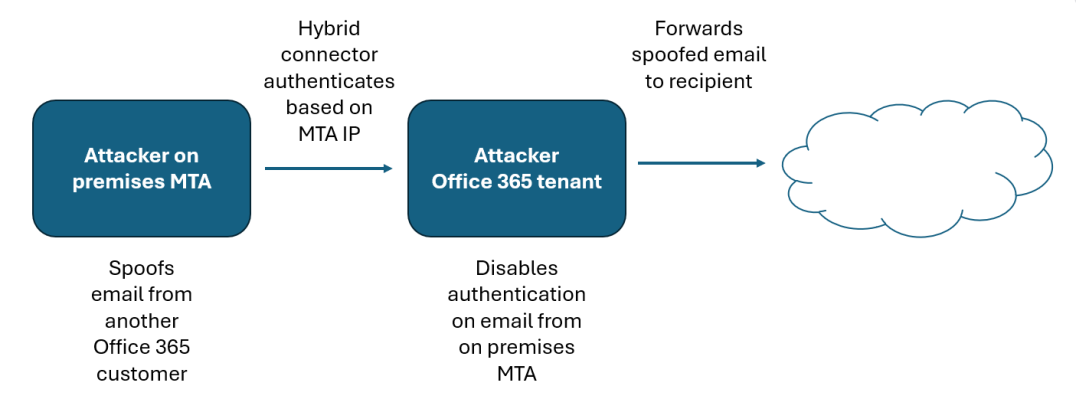
This attack is effective even when the company being impersonated has implemented strict authentication measures (e.g., APF, DKIM, DMARC with a=reject). Because the email is coming from the attacker's own on-premises server, it fails DMARC when it arrives on Office 365, but Microsoft replaces the DMARC rejection action with “oreject” which marks the email as spam but does not prevent it from entering the attacker's tenant.
Microsoft identifies this email as suspicious and, instead of sending it through the IP address range listed in their SPF record, it sends it through a “high risk” IP range: 40.95.0.0/16. Additionally, it does not DKIM sign the mail. This means that much of the mail is rejected by the intended recipient. But even in 2025, enough organizations still aren’t enforcing authentication checks on their inbound email that it’s worthwhile for attackers to put forth the effort.
Advanced attack flow
Beyond the basic attack described above, we’ve also recently seen an advanced version of this attack, which takes advantage of third-party email scanning services to add veracity to the spam emails. This approach, while requiring essentially the same amount of work as the basic flow (and even the original EchoSpoof variety), likely gives the attacker a greater chance of reaching their intended victim.
This attack starts in the same way as the basic attack but contains some extra steps:
- The attacker identifies an Office 365 customer (victim) that uses a hosted email security provider. The attacker can achieve this by examining public Mail Exchange (MX) records.
- The attacker creates an outbound connector on their Office 365 tenant that routes mail to the same hosted email hygiene provider used by the victim.
- Unless the victim takes additional steps to authenticate emails from Office 365, the mail will be processed as a legitimate outbound email by the mail hygiene provider. It will be DKIM-signed and delivered from IP addresses that are included in their SPF record.
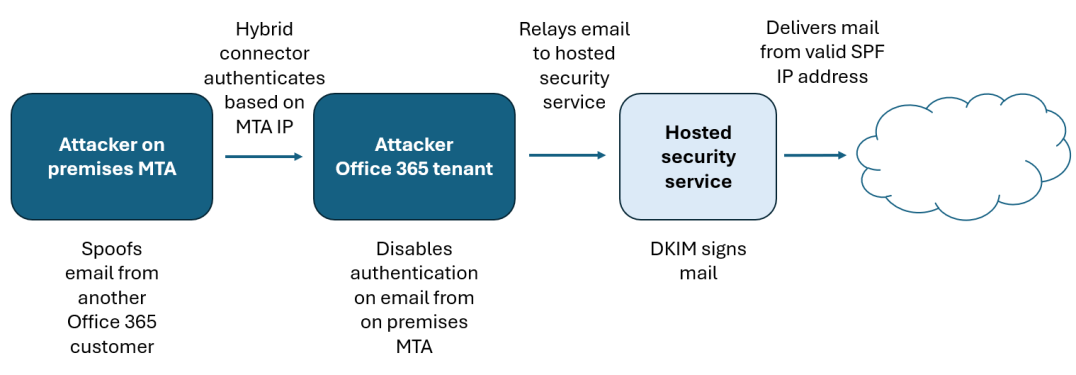
By delivering the DKIM-signed email from valid SPF IP addresses, the attacker has a greater chance of successfully reaching the victim’s inbox.
Mitigating the risk of new EchoSpoofing attacks
Don’t panic. Office 365 customers can take a number of steps to mitigate the risk of these new EchoSpoofing attacks.
- Implement strong authentication controls. Make sure that you have strong authentication controls (SPF, DKIM, DMARC) in place for all of your domains. In the basic flow, it is possible for the attacker to spoof your identity, but the mail will not be signed, which increases the likelihood that your authentication controls will keep the spoofed emails from reaching the victim’s inbox. Also, verify that your subdomain policies are enforced, as some DMARC vendors may protect the main domain but not the subdomains.
- Create additional protections via your hosted security service. Look for ways to apply specific data protection rules within your email security solution. For instance, we recommend to our Broadcom Email Security.cloud customers that they create a data protection rule to trigger on emails that do not contain their legitimate originator org ID. This currently isn’t something that the attackers can spoof as it appears that Microsoft will add the ID of the attacker and remove any spoofed headers.
- Avoid using the Microsoft “high risk bindings.” If your organization relies on a hosted email security service, we suggest looking at the configuration of your email flow and attempt to eliminate any “legitimate” use of the high risk pool. Broadcom will shortly be splitting our support for the Microsoft IP range into two separate options: “production” IP range and “high risk” IP range. Customers who don’t forward or relay through the “high risk” range will be able to deselect these IP addresses. This will prevent attackers from spoofing their identity through the service. If you want to check to see if any of your legitimate emails are using the high risk bindings, you can carry out a message trace in your exchange online tenant and look for the OutboundIpPoolName.
Read more from Microsoft on this spoofing behavior, and what you can do about it. (I can’t resist calling out the opening line from this Microsoft article: “Email servers in the Microsoft 365 datacenters might be temporarily guilty of sending spam.” Talk about an attention getter.)